Google Maps rank tracking
Pinperf: track where your businesses rank on Google Maps
Other tools hand you a grid of anonymous points. Here you place the locations that matter yourself — a junction, a neighbourhood, a client's address — and you give them a name. Your measurements finally speak the same language you do.
Essai gratuit, sans engagement.
The problem
A grid of points does not tell you where you are losing
A geo-grid measures where it is laid down, not where your customers search. It covers empty areas, misses others, and returns an average of colours that nobody can read back a month later.
Avantages
- Every measurement point sits at a precise address, where the search actually happens
- Chaque emplacement porte un nom : Ecully, Part-Dieu, agence du client
- One curve per location and per keyword, comparable from one month to the next
- No measurement spent on areas without customers
Inconvénients
- Points are imposed by the mesh of the grid, not by your market
- Results read as coordinates or cells, to be decoded at every measurement
- The grid average hides the gap between two neighbouring districts
- A colour map that has to be explained to the client in every report
Pinperf compared with grid-based tools
| Pinperf | Grid-based tools | |
|---|---|---|
| Measurement points | You place each point wherever you want, down to the street address | Imposed by a regular mesh around the listing |
| Reading the results | Every point carries the name you gave it | Coordinates or grid cells, to be decoded |
| Tracking over time | One curve per named location and per keyword | A grid average, which hides the gaps |
| Areas without customers | No measurement at all: you only track what matters | The grid covers the empty space too |
| What you show the client | A place name they recognise | A colour map that needs explaining |
Why Pinperf
Built for people who report to someone
Locations you name yourself
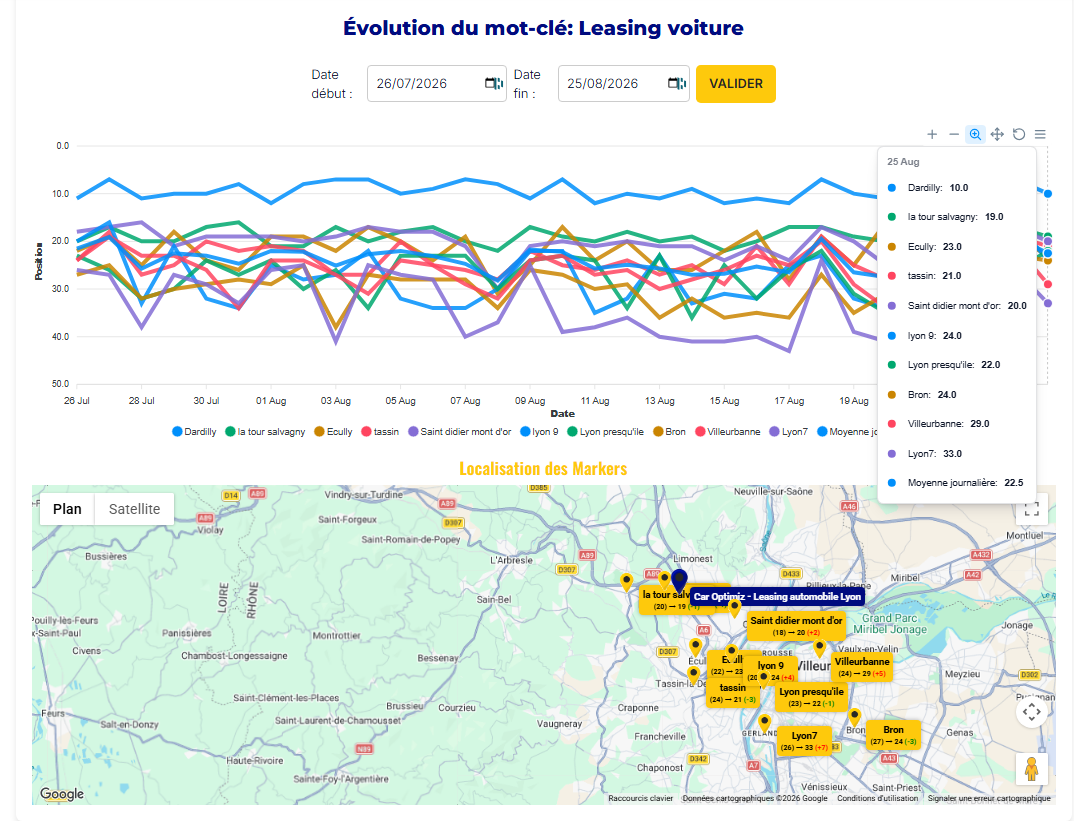
You point on the map, you name it, you track it. The name you choose is the one that appears in the charts, on the map, and in what you show your client.
Several listings, several clients
Agencies, consultants, freelancers: tracked businesses sit side by side, each with its own keywords and its own locations.
Readable without a manual
A ranking curve, a map of markers, the change since the last measurement. Nothing to interpret, nothing to convert.
Frequently asked questions
Drop your first locations today
Add a business, its keywords and the places that matter. The first measurement follows.
Free trial, no commitment.